How to Take the Perfect Photo for a Pet Portrait
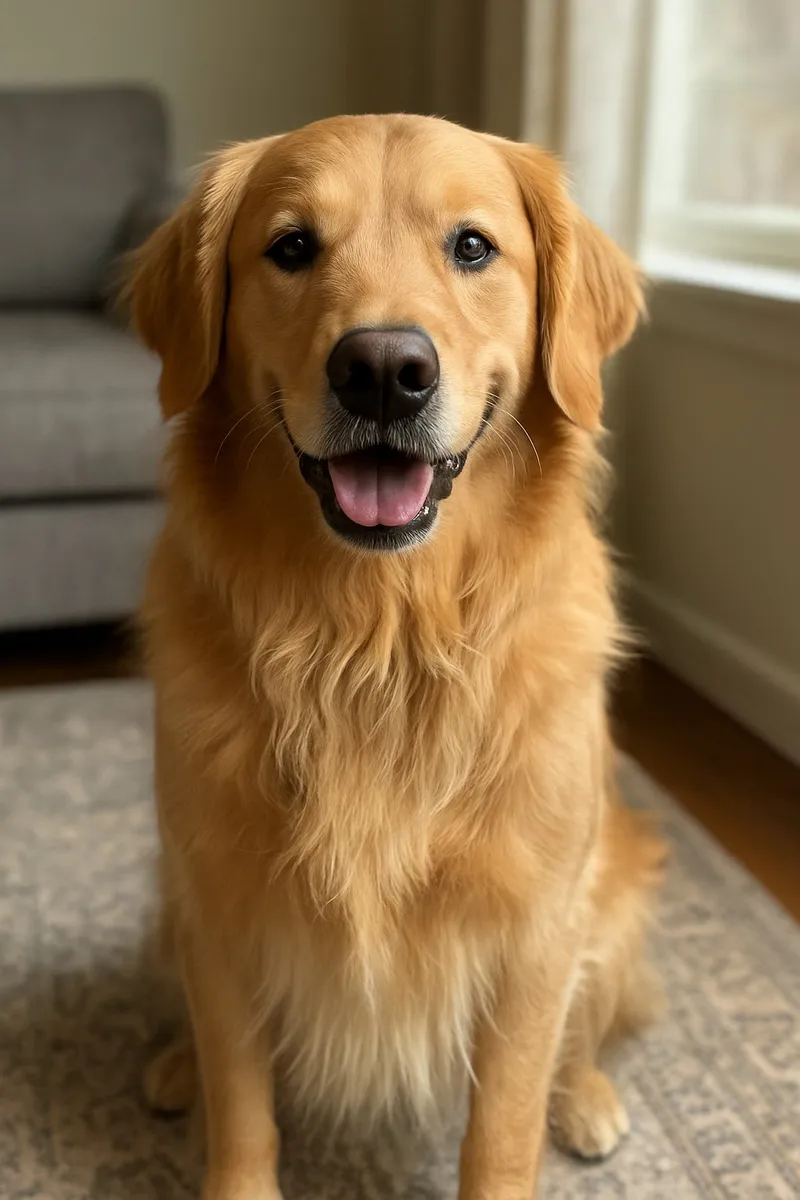
The best photo for a pet portrait is a sharp, close-up shot of your pet's face, taken at their eye level in soft natural light. You don't need a fancy camera: a modern phone, a few minutes of patience and a pocket full of treats will do it.
Below is everything that makes a real difference, from where to stand to how to handle tricky black or white coats.
Why the photo matters so much
A portrait is created from your photo, so the details you capture are the details you get: the shine in their eyes, the shape of their ears, the exact shade of their coat. A clear photo gives the art style plenty to work with. A dark or blurry one leaves it guessing.
The good news is that you can test before you commit. Because the preview is free, you can try a few different shots and keep the one that looks most like your pet.
Get the light right
Light is the biggest difference between a so-so photo and a great one.
- Use window light. Place your pet a few feet from a large window during the day, facing the light or at a slight angle to it. This gives soft, even light and a little sparkle in the eyes.
- Try open shade or a cloudy day outside. Overcast skies act like a giant softbox. The shady side of a house or a tree works too.
- Avoid harsh midday sun. It causes squinting, deep shadows under the brow and bright patches where fur loses all its detail.
- Turn off the flash. Flash flattens fur, startles a lot of pets and often gives that eerie glowing-eye effect.
- Watch out for backlight. If the window or the sun is behind your pet, your phone exposes for the bright background and your pet becomes a dark silhouette. Turn around so the light falls on their face.
Get down to their eye level
Most pet photos are taken from standing height, looking down. That gives you a big forehead, a tiny body and eyes looking up at an awkward angle. Instead:
- Crouch, kneel or lie on the floor so your phone is level with their eyes.
- Bring small pets up to you. A sofa, bed or sturdy chair puts a cat or small dog at a comfortable height (stay close so nobody tumbles off).
- Fill the frame with their face and chest, leaving a little space around the ears so nothing gets cropped.
- Move closer rather than zooming. Zooming in throws away detail.
Head-on or a slight angle?
Both work. A straight-on shot suits formal, symmetrical styles like The General. A three-quarter angle, with the head turned slightly, shows the shape of the nose and muzzle and often feels more natural. Either way, make sure both eyes are visible.
Phone settings that help
You don't need to touch anything complicated, but these small habits add up:
- Use the main lens (1×). Digital zoom and some ultra-wide lenses lose detail or distort faces.
- Tap to focus on the eyes. On most phones you can press and hold to lock focus and exposure there.
- Use burst mode for wiggly pets. Hold the shutter button and pick the sharpest frame afterward.
- Be careful with portrait mode. The fake background blur can smear whiskers, ear tips and fluffy edges. Take a regular shot too.
- Skip filters and beauty effects. They shift coat color. The art style adds the creative look later.
- Wipe the lens. Pocket lint and nose prints are the most common cause of hazy pet photos.
- Upload the original. Copies saved from social media or messaging apps are usually compressed. Use the file from your camera roll. JPG, PNG and HEIC files up to 20MB all work.
Treat and squeaker tricks for the perfect look
Getting your pet to look at the camera is half the battle. Try these:
- Hold a treat right above the lens. Their eyes follow the treat, so they look straight down the camera.
- Save the squeak for the moment you're ready. One squeak, a crinkled wrapper or a word they love ("walk?") gets perked ears and maybe a head tilt. The novelty fades after two or three tries, so don't waste it.
- Recruit a helper. One person stands behind you with the treat or toy while you focus on taking the photo.
- Tire them out first. A walk or play session beforehand gives you a calmer, more relaxed subject.
- For cats, bring a wand toy. Dangle the feather just above your phone. Cats rarely pose on demand, so go to them: their favorite sunny perch or windowsill is often your best studio.
- Keep it short and fun. Five minutes, lots of rewards, and stop before they get bored. You can always try again tomorrow.
Tricky coats: black and white pets
Black or dark coats
Phones often turn black fur into a flat shape with no texture, and the eyes can disappear.
- Use bright, even light falling on the face, such as near a window.
- Look for a small reflection of light in the eyes; it brings the face to life.
- Tap on the fur and nudge the exposure slider up slightly until you can see texture, without washing out the background.
- A mid-tone or lighter background helps their outline stand out.
Our black cat portrait page has more tips for dark coats, and they work just as well for black dogs.
White or very light coats
White fur has the opposite problem: it burns out into a blank patch.
- Avoid direct sun. Open shade is ideal.
- Tap on the fur and slide the exposure down a touch until the texture comes back.
- A slightly darker background helps define the edges of the coat.
Photographing two pets together
Two pets can be combined into one portrait at no extra charge, as long as they're both in the same photo. To get a usable shot:
- Make sure both faces are visible and in focus.
- Keep them at a similar distance from the camera so one isn't sharp while the other is blurry.
- Get them close together, on a sofa, dog bed or the floor.
- Have your helper hold the treat centered between them so both look in roughly the same direction.
- Use burst mode and pick the frame where both pairs of eyes are open.
Perfect matching poses aren't necessary. A clear view of each face matters much more.
Using older photos of a pet who has passed
If you're making a portrait of a pet who's no longer with you, you can't take a new photo, and that's okay. Many memorial portraits are made from older pictures.
- Look everywhere: your camera roll, cloud backups, old phones, family members' phones and old texts or emails.
- Choose expression over perfection. A slightly soft photo with their unmistakable look often beats a sharper one where they're turned away.
- Check your videos. Pause on a moment when their face is still and take a screenshot.
- Photograph printed photos flat in daylight, with no glare from glossy paper or glass.
- Find the original file rather than a compressed copy from social media.
Our pet memorial portrait page has more gentle guidance on choosing a photo.
Quick checklist before you upload
- Face fills most of the frame
- Eyes sharp and clearly visible
- Soft natural light, no flash
- Taken at your pet's eye level
- No filters or heavy edits
- The original, full-resolution file
Whether you're photographing a dog or a cat, these basics are what make a portrait look unmistakably like them.
Ready to try it?
Pick your favorite shot (or three) and see a free, watermarked preview in about 30 seconds, with no account or card needed. You only pay if you love the preview, and we email a digital proof before anything is printed. Create your pet's free preview.
Turn your pet's photo into art
Free preview in about 30 seconds — pay only if you love it.
Create My Pet's Portrait →